Sunday, December 15, 2019

Week 15:  The Fond Finale

Well here we are at the very end of the semester and I can't believe how quickly it flew by.  I went from a complete neophyte to a seasoned pro in 15 short weeks.  Okay, that is just a little bit of exaggeration; okay, okay, a lot of exaggeration. When we started I hadn't even heard of most of the tools/apps that we played around with, but I do feel like I did learn an awful lot in that short time and, even better, mostly had fun while doing it.  

I thought the first part of the course where we played around with various apps and tools was particularly helpful. The only way to learn, at least for me, is by doing. I'm particularly enamored of screencasting (I used Screencastify) and Padlet.  I also had never thought of using Flickr as a teaching tool and I really enjoyed learning about certain features that were new to me.  At present, the only teaching I've done (other than one-off instruction in the library) is how to use the databases so incorporating other technology is still theoretical for me. But I recently had a conversation with a friend whose son struggles with getting words down on the page so I showed her how to install the Read & Write extension and she is very excited for him to try it. 

The modules on social media and gaming were eye opening. I created Twitter and Instagram accounts that I promptly let lie fallow, though my kids occasionally look at them to see if I'm missing anything. Honestly, it feels like too much work to keep up with it--I don't know how teens have the energy (said like a true old person!).  As for gaming, it is a big enigmatic world to me: my gaming is limited to Scrabble and other word games that I play online with friends. But now I have a least a little understanding about the appeal of gaming and the importance it plays in some peoples' lives and that it can enhance creativity and problem solving skills, as well as be a place where people can role play without being judged.

Perhaps the most important thing I learned in this course is not to be intimidated by technology. Before this class, when my teacher friends would talk about their favorite tools, I would feel panic rising and a worried expression surely crossed my face that betrayed my ignorance. Now, I'm much more self assured and can even talk the talk sometimes!


Saturday, December 7, 2019

Top Ten Technology Tips for Teachers Redux (with Annotations)

1. Don’t feel like you have to master every product out there. Choose one of each type to know really well. Yep, still think this is true, maybe even more true because I realize how many products are out there that I've never heard of.

2. Exception to tip #1: If you are like most districts which rely heavily on Google: you need to know everything Google.  Take the time to learn it well and keep abreast of new applications. Confession: there are still lots of Google apps/tools I haven't tried but I definitely intend to!

3.  Most of us have our a particular computer/operating system that we feel most comfortable with, whether it is a Apple product, Windows, Android or Chrome. You need to be able to use them all! Still on board with this one too, but I admit to never having used an Android product.

4. Don’t be embarrassed to ask for help from a variety of sources. Within your own school you will find a surprising breadth and depth of technology knowledge. Everyone has their favorite and they just might have the answers you need.  Also, students are a great resource!  Just today I learned about an app, Audacity, from a foreign language teacher who said she used to use VoiceThread but it cost money so she was hoping to use Audicity instead. I had heard of VoiceThread but not Audacity so today I learned about new tool from a teacher.

5. Don’t exhaust yourself by trying out every new technology as soon as you hear about it.  It is okay to wait to see how others like it before taking the plunge. I would add to this that it is important not to become set in your ways and just stick to what you know--be open to trying to new tools. 

6. Remember that technology is supposed to help you to teach and your students to learn.  Don’t fall into the sunk cost fallacy of keeping doing something because you’ve invested time (or money) in it. If it isn’t working, be willing to scrap it and try something new. On the flip side, don't throw out something that works just because something new has come along. One of our science teachers uses Blackboard instead of  Google Classroom--she has used it for years and it works really well for her. She also likes it because she knows that when the students get to college they will most likely be using Blackboard not Classroom.

7. Do your research and talk to colleagues about what the like and dislike before investing the time into learning something new; remember though that everyone has different needs and skill levels so take theirs and yours into account when evaluating suggestions. Your fellow grade level subject matter teachers are your best allies in this department--don't go it alone.

8. Using technology such as a website or blog is a great way to communicate with parents but you need to keep it up to date--nothing is worse than a website that was started with the energy of a new school year and then languishes after a few months. In other words, don't bit off more than you can chew--think it through before going all in on a new tool that you need to keep on top of. You don't want it to become a burden.

9.  Model technology use in the classroom. This means more than just posting assignments and grades online or using a smartboard. There are lots of applications that enhance learning and are also fun for students. Get them hooked!. Sometimes we assume that just because students were born with a device in their hands that they will pick up new technology easily but that is not necessarily true. Just like us they need to be shown how to use it. Integrating technology into the classroom can expand your repertoire of teaching tools and engage students in creative ways.

10. Take advantage of any technology trainings your district offers. You might learn something you didn’t know that you didn’t know.  There are lots of really cool tools out there--have fun and explore! I know mine very occasionally offers training but unless mandatory they are sparsely attended. I think this must be technology overload, because we all think, who has the #@$# time?

And just to be bloodyminded (as my English mother would say), I would add one more to my Top 10 list (okay Top 11 now):

11.  Technology can be a huge help when it comes to working with students who, whether they are ELL students or have a physical or learning disability, need a little extra help. Translation, text-to-speech and speech-to-text apps are readily available as extensions or as stand alone programs.  Use them!

I know, I know, I failed to consider #11 in my own lesson plans, but I'm contrite!  Just this last week, several ELL students came to library and spoke into their phone and showed me the translation, and then I spoke back and they read the translation. A great way to communicate, especially for the students who are very new to English. It gives them a sense of agency and it enables me to help them better.


Sunday, December 1, 2019

Module 13--Interview with a Vampire Librarian

This week I interviewed Maria D'Orsi, the LMS at Medford High School, about Follett Destiny, the OPAC that is used for all the school libraries in our district. I personally have a little over 2 years using Destiny, so given my limited experience, it seemed wiser to go with the pro. 

How long have you been using Destiny?

We have been using it since around 2011.

What did you use prior to Destiny? 

We started using Spectrum Winnebago in 2001 in the elementary and middle schools, though the high school may have been using it prior to that time. 

 Why did you make the change to Destiny?

We had to change because Winnebago was no longer being supported. I was sorry to see it go because even though the functionality wasn't broad, it was easy to do every day things. It was easy to do a topic search and make bibliography and that bibliography contained just basic information so was very readable.  I liked its simplicity and found it very user-friendly.  In any event, it was time to move to a web-based platform to make access easier for students and teachers. Funding was tight, but I was able to make the argument that by using Destiny we could provide equity between the schools by allowing us to see what the other schools in the district had so we could share our collections. 

What platforms did you consider and what made you choose Destiny?

We looked at  a bunch of OPACs, including some of the free ones, but with those you had to provide your own training and it seemed like it would not end up being worth the savings.  I discounted a lot of the OPACS right off the bat because of the user interface--we needed friendly and easy for the younger grades. Other than Destiny, Alexandria was the biggest contender. The pricing was similar, but Destiny is just so much bigger and frankly the presentation was just much professional.  I liked the idea of the bigger company that offered the support and had 24 hour service.  I liked the interface better than Alexandria's. Also, I knew so many colleagues who use it that I knew I would have immediate support from experienced colleagues if I ever got needed it.    So maybe I was swayed by the bells and whistles but most likely it was because I went into it with a slight bias towards Destiny based on my colleagues' recommendations. 

What is the cost for Destiny?

We had to pay a fair amount of money upfront to get started, and now pay about $900 per school annually which comes out of the general technology budget, not each school's library budget.

What do like most about Destiny? 

You can do almost anything you can think of. It is very easy to check the circulation history of a particular title. I can run reports for anything I can think of. I can do batch updates easily which has been very helpful when we were genrefying the library and needed to update the location of our fiction books. Cataloging is very simple as I am almost always able to locate an item by its ISBN number, and then I just need to add the material number, the call number/spine label (for nonfiction we usually keep the suggested call number), the price and location.  Printing bar code and spine labels are a breeze though sometimes we need to fiddle with the alignment.  

We also pay for Destiny to host the software which means everything is stored on their server and they do upgrades automatically. If it was stored on our servers our IT would need to download every time there was an upgrade and I couldn't rely on them to do that properly.

What do you like least about Destiny? 

I don't find Destiny to be particularly intuitive, even for the simplest things. I never know if I need to go into Reports or  Back Office to find what I want to do. I often have to go online to look for youtube videos on how to perform a basic function. Because of this, there is just some functionality that I just don't use--it might be easy but it is hard to figure out which one applies to the job you are trying to do. I know I can call customer service but sometimes I end up more confused than when I started!  Also, sometimes Destiny makes changes and things pop up and you are not sure why it suddenly started doing something new.  

Would you ever consider changing to a different OPAC?

Given the learning curve involved, it would have to be a lot better than Destiny in order to get me to switch.  Right now, I haven't heard of any that sound tempting.


Sunday, November 24, 2019

Module 12: Cataloging, Part II
Performing Searches & Library Organization

 This week I had the pleasure of subbing for one of our elementary library paraprofessionals. This was fun because I got to read books to classes and actually see students who were still excited by books, unlike those way too cool high schoolers who won't admit to liking to read even if they still do. But in addition to the fun, it was instructive because it gave me the chance to not only see another library in our district but to see how it really works, i.e., to root around its organizational system. We get used to how our own system works but when you go to a new place and have to find your way around-- that is the real test of how good it is.

First, because the para had been out for 1 1/2 weeks before I showed up, I needed to check in all the books that had piled up and then I needed to shelve them.  Checking in was the easy part. Finding where everything went in the library not so much. Sure, I knew that PIC (author) went in the picture books section, but some picture books series were put in bins and there was nothing on the spine or in Destiny to tell me that and the signs on the bins were small and hard to read. It was similar with the Early Readers--there were a lot of bins on but some were alphabetical on the shelf and some were over with the pictures books! Not wanting to mis-shelve them, I left many of them on the cart for the para when she gets back.  There was a section called Non-fiction picture books that were clearly marked in the catalog and on the label, which was good, but their location, far away from the picture books and at the end of the regular non-fiction section, left a lot to be desired.  Also, some non-fiction books that were clearly early readers were nonetheless just listed with the DDS number, thus placing them with the regular non-fiction--a mistake in my opinion. Also, there were some short stories with SC on the spine, but no SC location--perhaps they are simply integrated into the fiction section as we do at the high school and the spine labels hadn't been changed yet.  In the end, I had to leave about 25 books on the shelving cart because I didn't want to put them back in the wrong location.  This strikes me as a problem because the organization wasn't good for either a librarian or a student.  

I'm not sure if the older students use the online catalog, as I only saw K-3 classes, and of these students only one tried to look something up but was confused about the difference between Destiny and Google.  When I figured out what he wanted it took us a while to find it.  Several students asked me if I knew where certain books were and I had to guess, sometimes successfully, sometimes not.  So, I think the problem was two-fold: first, the spine label was supposed to reflect what section the book could be found it, but did not always do that well, and second, the signage was inadequate to help anyone who didn't know the library well to find a book easily.  At the high school, we have a sublocation in Desinty that screams "Go to the XXXX section to find this book!" and while our signs could be bigger, they are pretty clear.  The elementary library fell down on both counts and I fear was more confusing to the students than it should be.


Sunday, November 17, 2019

Week 11:  Cataloging, Part I

I entered this week's reading reading with a medium to strong bias against the Dewey Decimal System.  From what I could see in my library, the number assigned to a particular book often meant that it would be separated from like topics, often in offensive ways.  Native American religions were sometimes in religions, sometimes in myths and sometimes in fairy tales.  Ancient civilizations have their own place, separate from their modern counterpart, unless they are Asian in which case they are lumped together. Granted, many of our non-fiction books are so old that I could blame previous librarians for their placement--many of the books don't have the DDS number on the title leaf and they certainly didn't have an OPAC to suggest a number for them. But even so, I find that too often books on a certain topic are scattered throughout several categories.  This makes browsing hard and looking up books by the call number confusing.  No wonder our nonfiction barely moves! 

Is there a better way? I learned the basics of the DDS as a kid and the logical structure always appealed to me. Even now, I like the logical nesting structure and finding the place for a book feels like finding where a jigsaw puzzle piece goes.  But if the goal is to group like items together to make them easier to find, I think it needs work. I am intrigued by the METIS system, but a it doesn't seem to have caught on widely and I think it is too basic for high school.  The bookstore model also shows promise, but I rethought that after reading a scholarly article which notes that bookstores are different from libraries because their goal is to make money, not spread information.  So I guess I've come back around to Dewey-Lite!

Which brings me to using the catalog to find books. I was quite interested in the subject heading v. keywords because when I students comes to me and tells me they are looking for a books about "X", I show them how to do a search in Destiny (which, I'm sorry to say, most do not know how to do).  I tell them to do the keyword search not the subject heading because it is more likely to come up with hits, which they can then narrow down.  For example, students in one of our ELA classes do research about the Dust Bowl and the Great Depression before reading Of Mice and Men.  If they do a subject search for "dust bowl" they get no hits, but a key word search turns up one item.  Given that there are certainly other books that contain at least some information about the Dust Bowl, I also see the limits of relying on the surrogate record. If I happen to know of a book that I should be in there and isn't, I can go in and add "Dust Bowl" to the record.  I'm going to try that and see what happens!

Sunday, November 10, 2019

Week 10:  Teaching Teachers (and Others)

I admit it: I'm terrified of teaching teachers!  Talk about a judgy crowd, especially if they don't want to be there and if they don't think you know anything about their subject. But it does seem unavoidable so what is the best way to go about it? I found the tips on this website helpful, especially the parts about asking teachers what they want to learn and about personalizing the learning process.  And I've come up with my own loose plan: first, show teachers what the technology can do for them, then a quick how to with some examples, then let them try it for themselves.  Ask them what they would like to be able to use it for and help them get there.  Connect with them after the training to if they have questions or if they have a chance to try it out in the classroom.  Ask for feedback. Offer to work cooperatively. Just like students, teachers are more likely to want to learn if you can show them the purpose and take an interest in their achieving results.

Of course, teaching doesn't just have to happen during professional development days--we can have tutorials available to watch at teachers' convenience.  I hadn't done a screencast before though I have seen a lot of them; I have to say I was amazed at how easy it was to do. I tried Screen-cast-o-matic first but it wouldn't let me create an account so I quickly moved on to Screencastify which was terrific. Some of my classmates mentioned Loom as another option so I will take a look at that some time.  I suppose the more screencasts you do the better you get at it but it took me probably 40 takes till I was sort of satisfied.  I tried it with a script but that sounded too forced, I tried winging it but kept messing up.  In the end I used a rough outline of where I wanted to go with some main points that I didn't want to forget.  When we actually do roll out our library website I would like to send the teachers a link to a screencast (probably not the one I just did!) although I'm sure many wouldn't watch and then will later say that they didn't know we had a website. But I also like the idea of putting up screencasts on the website in our "How Do I" section showing how to use the catalog, the databases or borrow and ebook or audiobook from the public library. The possibilities are endless!

Sunday, October 27, 2019

Week 8 -- Exploring Assistive Technology

I found out this week that 17% of the students in my district have IEPs and this figure doesn't include those who have 504 plans. This was a wake up call to assess our high school library and see what we can do to make it a more accessible learning environment to all students.  This is especially important because only a few of the SPED classes come to the library as a group--why don't they come? In addition, many of the students on IEPs are in mainstream classes so we don't even know who they are.  When we help students develop library skills and access to information, we need to take down barriers, not put them up.  There are some simple things we can do to make the library physically more accessible--better signage, comfortable chairs, a quiet area with dimmer lights. We have headphones that students can use if they need to listen to text.  But for me, the main take away is that I need to check my own assumptions when helping students access information. If a student is looking for a book to read, we need to understand their reading level as well as their interests and make sure we stock books at a variety of levels (this is good for ELL students too).  At the high school level, we work with both science and social studies classes teaching students how to conduct research. We need to be coordinating with teachers to be aware which students could benefit from lower lexile levels and the text to speech options built into databases. And, as I continue to work on our new website, I will use the Web Content Accessibility Guidelines as well as these Accessibility Tips
 from Libguides regarding layout, colors, fonts, images and assets, among other things.

One of the most important points, however, is that designing a library's physical spaces and its resources with all users in mind benefits everyone. Further, assistive technology can be useful to those who don't require it for learning--audiobooks or text to speech/speech to text are becoming universally enjoyed. 

Sunday, October 20, 2019

I found this week’s to be extremely interesting. As the parent of three teenagers, I have often despaired over how much time the spend on their phones. I’m not exactly anti social negus, but I sure wished they would less time on it.  “Why don’t you go outside, invite your friends over, do something!” I would implore.  I also absorbed all the fear mongering about bullying and mental heath issues.  So this week, when I started doing the reading, I was surprised to find there are quite a few people out there talking about the benefits of social media, which, quite honestly, had never occurred to me, First I read KJ Dell’Antonia’s article saying it’s not all bad out there and that social media allows teens to make connections with real friends online but also enables them to meet new ones, which reminded me that I connected with one of my classmates online and we have now met in person a bunch of times (hooray for virtual learning!). I then read danah boyd’s It’s Complicated and was so taken by the introduction that I quickly read the whole book. I love her positivity around the teenagers use of social media and her explanation of how they use it, why they use it the way they do and some of the myths  that make many of believe it pernicious and even dangerous. I particularly related to the chapter on privacy and how adults need to stop following their kids and generally butt out if their online lives. Finally, I appreciated her take on the prevalence of racism and how simply  shaming perpetrators is not the answer. Since this book was published in 2015, I was curious if more recent studies offered up evidence that would counter boyd’s.  What I found was some of each type: underlying vulnerabilities, not social media itself, cause the problems; the amount of time spent on social media has a negligible effect on teen's sense of well being; and studies that point to social media causing depression, anxiety and sleep disturbances.  So I guess the jury is still out.

With respect to online gaming, I admit to not be a gamer or having any serious gamers in my family. The closest we get to gaming is my son playing xbox with his friends (usually soccer).  Since we don't have xbox live, he has to play it with them actually in the same room.  He plays Fortnite occasionally but seems to have grown bored with it of late.  So even though I appreciated the premise of Reality is Broken, it is just wasn't personally appealing.  I do understand how role playing games can be fun, educational and even life-saving, but no thanks. I'll take broken reality anytime.

Sunday, October 13, 2019

Into the Wild: My Adventures With Social Media


My experiences with social media are similar to my experiences in the great outdoors: I love to be outside and go for day hikes, but I draw the line at camping--give me the comfort of a B&B for the night please. In other words, I dabble. I lurk. I linger. But I'm not an active, deeply invested participant.

I've used Facebook for years, originally signing on so I could play Scrabble with a law school friend (and it is still my main use). I then realized that Facebook is a mostly enjoyable way to see what people who I know but don't see often, are up to.  
I have found Facebook to be good for one other thing: groups.  I'm part of several community and school groups. I also just joined a few library ones which are great: Future Ready Librarians and Fellowship of High School Librarians.  So many great posts and ideas.  I will definitely continue to haunt those, though I'm worried they could be a huge time suck!

Another form of social media I've used is blogs, especially when getting ideas for our high school library. I was already acquainted with The Blue Skunk Blog, The Daring Librarian and Adventures of Library Girl. This week I really enjoyed searching out others and found Joyce Valenza's School Library Journal blog, as well as Pernille Ripp's blog which has so many great posts.

As for other forms of social media, I know about them, mostly through my kids.  Instagram came first, when my oldest asked to get an account when she was in 7th grade (she ended up deleting it a few years later when she decided it was too distracting).  Vine was popular for a while but then folded.  Then came Snapchat with its dangerous, disappearing pictures.  And most recently TikTok which apparently none of them use but which is popular among their friends.  My high school senior uses twitter, but mostly it seems to follow political issues.

But, other than Facebook, I didn't use any of these apps myself.  So this week I took the plunge, signing up for Instagram and Twitter.  I have to say, I totally see the appeal of both.  It's nice to be able to be able to easily see posts from people who you care about or find interesting (like my daughter, my Twitter feed so far is mostly political news).  And I will talk again to my LMS about creating an Instagram account for our library. There are lots of times we want to reach students and let them know about new books, activities and such and right now the only way we can do that is through morning announcements so we leave that for the really important stuff. But one thing that concerns me is that the students get so many social media pings throughout the day, won't ours just get lost in the morass?  


Sunday, October 6, 2019

Here is the Animoto video I made of our family trip to Iceland.  It was fun to make though I'm still finding some of the limitations frustrating. I decided not to narrate but added my own music instead--Edvard Grieg's Peer Gynt Suite No. 1: Morning Mood, Malmo Symphony Orchestra, Bjarte Engsest conductor--which fit well with the scenery.  Adding it was super easy--just downloaded  the free and downloadable mp3 file  to my computer, then uploaded it to Animoto.

And if you have never been to Iceland, I hope this video makes you want to go!


Sunday, September 29, 2019

About those Apps...

This week I noodled around with some completely new and some not so new apps.  There were a few I loved, a few I disliked, and the rest, well they were okay and I will probably use them at least once in a while.

Let's start on a positive note with the ones I loved: Animoto, Glogster and Screencast-o-matic. They are all simple to use (okay I haven't actually made a screencast yet but I watched lots of how to videos), they have lots of educational uses and the finished product looks professional.  Animoto produces a slideshow that is far superior to Google Slides and much simpler than PowerPoint.  The free version has a large watermark in the bottom right corner which is pretty annoying but is that is the price you pay for getting it free for educators.  Sadly, I couldn't find a plan for educators that gives more options for multiples users--it is the personal at $60/year or the professional for $400. Glogster produces a multimedia poster that has pictures (including 3-D ones), text, links, video, audio and embedded content. You can exhibit your creation online or print it out.  What a much more interesting and creative way to produce a report than gluing picture and text on a posterboard. Like Animoto, there are limitations to the free account: you can only post 6 content items (which is hardly any) to each product. Unlike Animoto, Glogster has a great price for educators which is only $39 for elementary (30 students) and $95 ($125) for high school.  Both Animoto and Glogster have lots of stock photos or it is super easy to upload your own. Did I say already how much I love both these apps?

As for Screencast-o-matic, I'm excited to try it out.  It seems so incredibly useful, both to educators and students; the former can post tutorials and the latter can create video projects. And it's free!

Now on to the apps that didn't wow me:  Voki and Big Huge Labs.  Don't get me wrong--Voki was cute and I can absolutely see that it would be fun to use in an elementary school setting but the options for which avatars you can use are so limited that I think you would need to pay for. Plus, it just seemed kind of low tech and cheesy to me. Speaking of cheesy, Big Huge Labs' website is terrible.  And while some of the products are fun to make, the parameters are quite limited and I don't see that much educational value to many of them. Though that might be because I'm just creative enough.

As for Timeline, BubbleUs, Doodle, Survey Monkey and Zamzar, they are useful for sure but I'm going to keep my eyes open for alternatives. Timeline was too simple--I'd like to find one that is a bit more sophisticated for high school students.  As for Zamzar, I feel like students mostly want to convert pdf into Google Docs which they can already do without using a converter.  I might use it to convert into Word though.

A final word about Flickr: I've had an account forever though just as a place to store photos--I never thought of it as an educational tool.  It is too bad about not being able to annotate photos but you can still insert text and stickers so it still is somewhat useful in that regard.  Plus you can create private groups and download photos from the Commons so it is still a really good resource.

Sunday, September 22, 2019

Some Notes on My Exploration of Educational Apps and Tools 
(or Whatever You Want to Call Them)

There's so much out there, it makes my head spin! I poked around and created accounts with the ones that seemed the most useful to both me and students and the ones easiest to learn: Padlet, Feedly and Diigo. Here are my thoughts:

Padlet So simple, so fun and so many possibilities! I didn't do anything fancy with mine other than add a custom wallpaper, but I really like the collaborative aspect.  I talked with a friend who is a middle school social studies teacher about her favorite technology that she uses in the classroom and Padlet was the first one she mentioned.  She showed me a couple of different boards she had students contribute to recently: one was a 45 second advertisement for an everyday object that they had to come up with a unique use for (really funny) and another was a bulletin board where each student had to post a pictures with a description and a link to an article about the Syrian refugee crisis. I love the idea of using it for book trailers and book reviews.  Creative, fun and educational. What's not to love?

Feedly I can be a bit of an information junkie and spend too much surfing various new sites, so the idea of an RSS feeder is appealing to me.  I chose Feedly because it seemed to have good reviews and was very easy to set up. I chose a topics to create folders for (politics and library blogs) and chose websites to add to my feed.  I checked in a while later, and sure enough, there were a bunch of headlines but I can't say I was all that excited. I realized what I really want is a service that will bring attention to things I might otherwise have missed regardless of the source. When I looked up if that was possible, I discovered the keyword filter was the exactly the solution I was looking for.  Unfortunately I need to pay for a premium account to get that service and I'm not willing to do that just yet.

Diigo I took a look at this one because a couple of classmates mentioned on their discussion posts that they liked it. I watch a tutorial and then tried it out myself.  This is one I can actually see using, and I love how simple it is to use with the chrome extension.  I often read things online that I want to save for later or mention to a friend and then can't remember where I read it and I think Diigo is a great bookmarking tool.  I also think it would be very useful for high school students when they are doing research. I also love the fact that they article is archived so that you can retrieve it even if the link becomes broken.  


Sunday, September 15, 2019

Random Thoughts On Augmented Reality

Whatever happened to Google Glass? Like the Segue (remember code name Ginger?), it was hyped as a world changing invention.  Well we are not all riding Segues, nor are we wearing Google Glasses. But it does look the technology behind Google Glass has infiltrated our lives, just not in the way originally intended.  

I was reminded about Google Glass when I was read Joyce Valenza's top ten tech trends from December 2014. She predicted that augmented reality would become an educational game changer, but I had never even heard of the term. Admittedly, I don't follow tech trends, so it is not that shocking, but surely if it were that BIG a thing I would have heard of it by now. Intrigued, I looked it up and then, whoosh! down the rabbit hole I went.

My first stop was the AR apps mentioned by Valenza. Zooburst is defunct. ColAR is now owned by Quivervision and it consists of printing out coloring pages and then using the app to choose that page and then you can view what you colored through your phone in 3d and make it move around by turning the colored page. ChromVille works the same way coLar, but its coloring pages topics include science, geography and water. Kind of fun, but not that exciting and probably mostly interesting for 6-8 year olds. Anatomy 4D was okay, but again I was not wowed. The most sophisticated on is Blipbuilder by Blippar which looks complicated to learn so I'm not sure how generally useful it would be.

I then did a search for "augmented reality education apps" and landed on this page from a year and a half ago which list 15 supposedly game changing apps in education. I looked up a number of them and well, most were just meh. The most interesting thing I learned is that you can use the Google Translate app on your phone to view a word in another language and the translation appears over the original word.  I really liked that! It turns out that you can also just use your Google app and click on the Google lens icon in the search bar and do the same thing.  Plus Google Lens has lots of other functions so of all the AR apps I looked at, it is the one I am most interested in.

Looks like there are some pretty cool things you can do with augmented reality. Five years on, is it a big deal in education?  Probably not yet, but maybe one day. 


Sunday, September 8, 2019


Top Ten Technology Tips for Teachers 
(in no particular order)

1. Don’t feel like you have to master every product out there. Choose one of each type to know really well. 

2. Exception to tip #1: If you are like most districts which rely heavily on Google: you need to know everything Google.  Take the time to learn it well and keep abreast of new applications.

3.  Most of us have our a particular computer/operating system that we feel most comfortable with, whether it is a Apple product, Windows, Android or Chrome. You need to be able to use them all!

4. Don’t be embarrassed to ask for help from a variety of sources. Within your own school you will find a surprising breadth and depth of technology knowledge. Everyone has their favorite and they just might have the answers you need.  Also, students are a great resource!

5. Don’t exhaust yourself by trying out every new technology as soon as you hear about it.  It is okay to wait to see how others like it before taking the plunge.

6. Remember that technology is supposed to help you to teach and your students to learn.  Don’t fall into the sunk cost fallacy of keeping doing something because you’ve invested time (or money) in it. If it isn’t working, be willing to scrap it and try something new.

7. Do your research and talk to colleagues about what the like and dislike before investing the time into learning something new; remember though that everyone has different needs and skill levels so take theirs and yours into account when evaluating suggestions.

8. Using technology such as a website or blog is a great way to communicate with parents but you need to keep it up to date--nothing is worse than a website that was started with the energy of a new school year and then languishes after a few months.

9.  Model technology use in the classroom.  This means more than just posting assignments and grades online or using a smartboard.  There are lots of applications that enhance learning and are also fun for students. Get them hooked!. 

10. Take advantage of any technology trainings your district offers.  You might learn something you didn’t know that you didn’t know.  There are lots of really cool tools out there--have fun and explore!


Tuesday, August 6, 2019


Title: Barely Missing Everything
Author: Matt Mendez
Recommended Grade Level: 9 and up
Summary: Juan and his friend JD dream of getting out of El Paso hometown and away from their complicated personal lives. When Juan finds out his father may not be dead after all but incarcerated, the two friends take a road trip to visit him while also embarking on a journey of self-discovery. Where I found it: Goodreads.com
Why I chose it: This books gets lots of comparisons to Mexican Whiteboy which my 14 year old son just read and really enjoyed. I also like that it is a book that might appeal to boys but isn’t all about sports.

"Mendez offers enticing glimpses of Mexican-American life, and he has an uncanny ability to capture the aimless bluster of young boys posturing at confidence, behaving rashly to mask feeling insecure...we can almost feel the existential claustrophobia of adolescence." Mj Franklin, ~ The New York Times, Book Review 


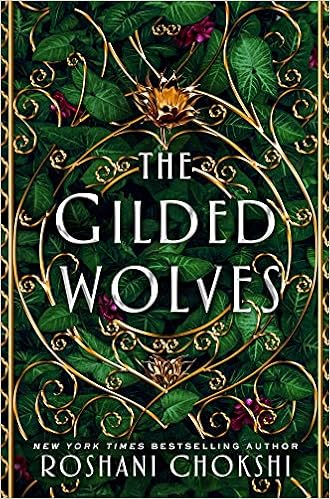
Title: The Gilded Wolves
Author: Roshana Choksi
Recommended Grade Level: 9 and up
Summary:  Wealthy hotelier Séverin Montagnet-Alarie is forced to undertake a mission on behalf of the elite Order of Babel in nineteenth century Paris.
Where I found it: Public Library
Why I chose it: The reviews describe it as a book of suspense and intrigue that is hard to put down.

“Chokshi delivers a thrilling, gritty new fantasy set in an alternate nineteenth century Paris… Chokshi shines as a master storyteller in her newest novel; the setting, world building, plot, and conflict are all staggering. However, the elements that perhaps shine the most are the history, riddles, mysteries, and science, woven together in a world brimming with power and magic.” ― BOOKLIST, Starred Review

Beware the NightTitle: Beware the Night
Author:  Jessika Flek
Recommended Grade Level: 7 and up
Summary:  On the island of Bellona, people are sacrificed to the Sun in order to protect themselves from the Night, a group of dangerous people which snatches citizens during the night. Seventeen year old Veda finds out that the story she has been told about who is good and who is bad is not so clear cut after all as she embarks on a journey to save her grandfather from being sacrificed.
Where I found it: Public library
Why I chose it: It sounds like it would appal to teens--fantasy, romance adventure all in one.

The first in a series, this fantasy adventure is quickly paced with surprises at every turn and an ending that will leave teens breathless and awaiting more. Fleck has crafted a fully realized world complete with its own history and mythology to immerse her readers. VERDICT: Finely tuned and masterfully written, this is a must-purchase for all fantasy shelves." --School Library Journal


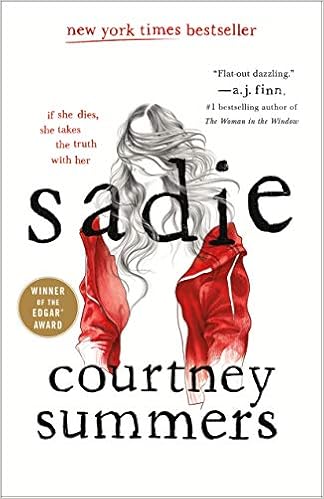
Title: Sadie
Author: Courtney Summers
Recommended Grade Level: 9 and up
Summary: Sadie has spent her life trying to keep her younger sister Maddie safe, but then Maddie is murdered and Sadie is determined to find the man she knows killed her sister.
Where I found it:  My school library
Why I chose it: This sounds like it is both suspenseful and heart-wrenching, a combination that I think will appeal to teens.
Awards: Amelia Bloomer Lists - Young Adult Fiction: 2019
               Edgar Allan Poe Awards: Best Young Adult
   School Library Journal Best Books: 2018

“This is one of those stories that seeps into your bones somewhere along the way, and it changes the way you look at the world a little. It is the best mystery—and one of the best books, period—that I have ever read, and it is also one of the bleakest, most devastating reading experiences of my life.”-- Amazon reviewer